
AI pixel art generator for game developers
Create sprites
Generate new pixel art, reskin and remix the assets you already have, and finish them with real canvas tools — then sync to your repo.





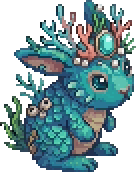
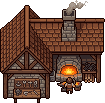
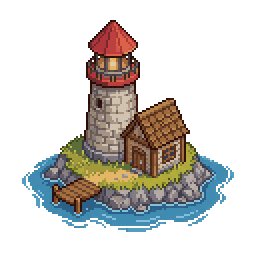



Generate pixel art sprites from a text prompt
Generate game-ready pixel art from a text prompt—characters, enemies, items, weapons, props, tiles, UI icons, and full environments. Every sprite lands on a real pixel grid as fully editable layers, so you can fine-tune directly in the built-in pixel art editor without leaving the canvas. AI generation, palette control, and pixel-perfect editing are fully integrated in one workflow.
Read the AI prompting guideEdit any sprite with AI, in a sentence
Describe the change and MagicPixel applies it while preserving the original silhouette, palette, and pixel density. Damage states, weather, accessories, expression, time-of-day. Iterate as many takes as you want and keep the source layer intact.
Read the AI prompting guideReskin any pixel art asset to generate creative variants
Start with any asset and generate creative variations or reskins to get instant alts with new colors, gear, expressions, and themes. The source silhouette and proportions stay perfectly consistent—ideal for creating character cosmetics, environmental variations, and themed game assets in seconds.
Read the AI prompting guideGenerate matching item sets

Give MagicPixel a reference sprite and a count to instantly generate a cohesive set of pixel art characters, creatures, weapons, potions, tiles, or UI icons. Every asset in the set shares the same palette, lighting, scale, and rendering style, so they read as one unified art kit—no mismatched pieces, no hand-tuning required.
Read the AI prompting guide
Lock every sprite to your game's color palette

Import your studio palette as .gpl, .hex, or .pal from Aseprite, GIMP, or any palette site, or start from a ready-made palette with every hex code listed. Cap AI generations at 8, 16, 32, 64, 128, or 256 colors so nothing ships with off-palette shades. One click re-maps any imported or generated sprite to your exact palette, silhouette and detail preserved.
Browse free pixel art color palettes
Sync pixel art assets straight into your repo
Run the MagicPixel CLI once and every saved asset writes into your project folder. Works with Lovable, Unity, GameMaker, Godot, or any project that loads PNGs. Renames, version bumps, and deletions sync cleanly so you never end up with orphan files.
Read the CLI sync guide

 GameMaker
 Godot
GodotGenerate pixel art from Claude, ChatGPT, or Cursor
Add MagicPixel as an MCP server in Claude, ChatGPT, Cursor, GitHub Copilot, or any MCP client — your agent can generate sprites, create variants, list projects and assets, and check credits, with results landing in your library. Claude and ChatGPT only need the URL below: paste it into Connectors and approve once. Cursor needs a short extra step in Settings → Agent integrations.
MCP server URL
https://magicpixel.art/mcpClaude & ChatGPT: Connectors → add MCP server → paste → approve. Done.
 Claude
 ChatGPT
 Cursor
 Copilot
Import Aseprite, PNG, and sprite sheet files
Drag in .aseprite, .ase, .png, or animated GIFs. Frames, layers, and animation tags are preserved natively, no PNG round-trip required. Sprite sheets and GIFs are auto-decomposed into separate frames you can edit, recolor, or feed back to the AI as a style reference.
Read the components guideFAQ
Questions game developers ask
- What is MagicPixel?
- MagicPixel is an AI pixel art generator and editor for game developers. Describe a sprite, prop, tile, or UI icon in plain English and get back grid-aligned, palette-disciplined pixel art at the resolution and brush size your game uses, from 16×16 up to 1024×1024, ready to edit on the same canvas.
- How is MagicPixel different from other AI image generators?
- MagicPixel is a complete standalone pixel art editor with AI built in, not a chat box that hands you a blurry PNG. Generations land directly on a real pixel grid as editable layers, so you can paint, erase, palette-snap, and transform with proper canvas tools without ever leaving the tab. One workspace replaces juggling a chat tool, Aseprite, a palette site, and your file explorer.
- Can MagicPixel generate sprite sheets for Godot, Unity, GameMaker, or Phaser?
- Yes. Generated sprites export as standard PNG sprite sheets or per-frame PNGs that drop straight into Godot, Unity, GameMaker, Phaser, LÖVE, Bevy, or any engine that loads PNGs. Variants, matching sets, and animation frames are produced as ready-to-import strips.
- Is MagicPixel free to try?
- Yes. The editor is free to use. To use the integrated AI features, a paid subscription is required.
- Can I sell the pixel art I generate with MagicPixel?
- Yes. Assets you generate are yours to use commercially in games, apps, marketing, or resale, including paid Steam, itch.io, and mobile releases. You can also sell your assets on the MagicPixel marketplace for AI credits which can be used in the app.
- What sizes does MagicPixel support?
- Standard pixel-art sizes from 16×16 up to 1024×1024, with brush-size control so you can target 1px, 2px, 4px, or 8px logical pixels per drawn cell.
- Does MagicPixel import Aseprite files?
- Yes. Drop in .aseprite or .ase files and frames, layers, and animation tags are preserved natively, no PNG round-trip. Standard PNG sprite sheets and GIFs are also auto-decomposed on import.
- How does the AI match my game's style?
- Provide a reference sprite and MagicPixel matches palette, silhouette, and pixel density across new generations, reskins, variants, and matching sets, so new assets belong to the same game as the old ones.
- Does it integrate with my codebase?
- Yes. The MagicPixel CLI syncs saved assets directly into your project folder. Works with Godot, Unity, GameMaker, Lovable, or any project that loads PNGs. Renames and deletions sync cleanly so you don't end up with orphan files.
- Does MagicPixel work with Claude, ChatGPT, or Cursor via MCP?
- Yes. MagicPixel exposes a Model Context Protocol (MCP) server so Claude, ChatGPT, Cursor, GitHub Copilot, and other MCP clients can generate pixel art, create variants, list projects and assets, and check credits. Claude and ChatGPT only need the MCP server URL from the homepage — paste it into Connectors and approve once in the browser. Cursor setup is in Settings → Agent integrations.
More walkthroughs in the pixel art guides.
Start generating game-ready pixel art
Free to try. Bring your own style or start from scratch.