
Pixel art MCP server for Claude, ChatGPT, Claude Code and Cursor
MagicPixel's MCP server lets an AI agent make and change pixel art for your game, signed in as you. It can generate sprites, reskin the assets you already have, sort them into projects and folders, and check your credits. Everything it makes goes into your MagicPixel library, where you can open it in the pixel art editor and sync it into your game project.
MCP server URL
https://magicpixel.art/mcpNo API key. Your client opens a MagicPixel sign-in page once, and you approve it there.
Connect your client
Claude (web and desktop app)
- Open Claude Connectors → Add custom connector.
- Name it MagicPixel and paste the URL above.
- Turn it on from the chat composer, approve on magicpixel.art, then ask Claude to make something.
Claude Code
Add the server from your terminal:
claude mcp add --transport http magicpixel https://magicpixel.art/mcpThen start claude, type /mcp, pick magicpixel, choose Authenticate and approve on magicpixel.art. Claude Code can then make the art your game code needs while you build it. With the sync CLI running, the files show up in the project folder too.
ChatGPT
- Open ChatGPT Connectors → Advanced and turn on Developer mode.
- In the chat composer's + menu, turn on Developer mode.
- Click Add sources → Connect more.
- Name the connector MagicPixel and paste the URL above.
- Approve on magicpixel.art, then ask ChatGPT to make an asset.
Cursor
Cursor connects through a small local proxy (Node 20 or newer), because its built-in sign-in for remote servers doesn't finish with MagicPixel yet. The ready-to-paste config and steps are in Settings → Agent integrations inside the app.
What an agent can do
The server has 23 tools. Only the ones that make art spend credits.
Make new pixel art
Generate sprites, props, tiles, UI icons and textures at 64, 128, 256, 512 or 1024 px. Long runs keep going in the background and the agent collects them when they finish.
Cost: Generation spends credits. Collecting a result and rewriting a prompt don't.
- generate_pixel_art
- get_generation_result
- enrich_prompt
Change art you already have
Reskin, vary, edit or replace an existing asset at its own size, turn one sprite into directional views, or move a design from one piece of art onto another.
Cost: Spends credits.
- generate_variants
- generate_directions
- apply_with_ai
Library and projects
List projects, folders and assets, open an asset with a preview, and create projects and folders so results land where your game expects them.
Cost: Free.
- list_projects
- create_project
- create_folder
- list_assets
- get_asset
- whoami
Style
Read and update your active style, upload style references, and add images to the style every generation follows.
Cost: Free.
- get_style_profile
- update_style_profile
- list_style_references
- get_style_reference
- upload_style_reference
- get_style_set
- add_style_sample
Asset library and credits
Search the ready-made asset library, check your plan and credit balance, or get a checkout link to buy more credits.
Cost: Free.
- list_marketplace_assets
- get_marketplace_asset
- get_credit_balance
- create_credit_checkout
Real results from an agent
In one session, an AI agent built a small top-down dungeon kit by calling generate_pixel_art once per asset. Each sprite below is shown exactly as it arrived in the library, with the prompt the agent sent. Nothing was retouched. They're enlarged with hard pixel edges so you can see them.

Hero · 32×32
“young hero adventurer with green tunic and small sword, top-down RPG view, facing down toward camera”
Slime · 32×32
“green slime blob monster, top-down RPG enemy”
Bat · 32×32
“purple cave bat with spread wings, top-down RPG enemy”
Heart · 32×32
“red heart health pickup”
Coin · 32×32
“shiny gold coin”
Floor tile · 32×32
“seamless dungeon floor tile, grey stone flagstones, full square tile filling entire canvas edge to edge”

Agents tend to write longer, more specific prompts than people do. This one described the camera, light and canvas fill: “A pile of chopped firewood logs stacked in a small pyramid, seen from a steep front-facing top-down camera: top of the pile and the round cut log ends visible as slightly flattened ellipses with light tan growth rings, warm brown bark along the log sides, lit from overhead. Compact decoration prop filling about 60% of the canvas, centered, no ground, no cast shadow.”
Changing art the agent already made
An agent can also work on assets that are already in your library. These follow-up calls ran on a knight and a fox it had just generated. Each result was added as a new artboard in the same file as its source, at the source's size.
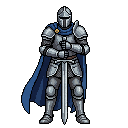 Blue knight (source)
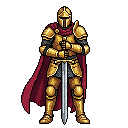 Gold
Gold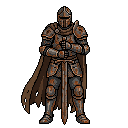 Bronze
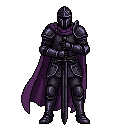 Shadow
 Fox rogue, facing south (source)
 East
East West
West North
North
Things to ask once you're connected
- Make a 64×64 top-down slime enemy for my dungeon project and put it in a folder called enemies.
- Look at the crate in my props folder and make three variants of it: mossy, burnt and frozen.
- Take my hero sprite and give me 4 directional views of it.
- Find a UI icon pack in the MagicPixel asset library.
- How many credits do I have left?
Agents follow your project's style settings and style samples, the same as generations started in the editor, so what they make matches the rest of your art.
Credits, long runs and refunds
- Credits are held while a generation runs and only kept once the asset is saved to your library. Failed or undelivered runs are refunded.
- A request the content-safety filter blocks is still charged.
- Runs longer than about 25 seconds return a run ID so the chat doesn't time out. The agent then collects the result with the same ID, without paying again.
- Credits come from a plan or a one-time credit pack.
Check the app name before you approve
The MagicPixel approval screen shows the name the connecting app registered. Anyone can register an app, so only approve if the name matches the assistant you're connecting. These names are recognised as genuine:
- Claude
- ChatGPT
- Cursor
- Windsurf
- Codex
- MCP CLI Proxy
Anything else, including lookalikes like "MagicPixel Official", shows an Unverified app warning. Deny it and report it if the name isn't what you expect.
Refresh after MagicPixel updates
Clients remember the tool list. When MagicPixel adds tools, refresh the connector so your assistant sees them.
ChatGPT
- Open app preferences and pick MagicPixel under Enabled apps.
- Next to Information, click Refresh.
- Start a new chat and ask ChatGPT to use MagicPixel.
Claude and Claude Code
In Claude, open the Connectors page, select MagicPixel and refresh its tools. In Claude Code, restart the session or reconnect from /mcp.
MCP questions
- Do I need an API key to use the MagicPixel MCP server?
- No. You paste the server URL into your AI client and sign in to MagicPixel once in the browser. The client then works as you, with your library and credits.
- Do I need a subscription?
- Browsing your library, projects and the asset library is free. Generating spends credits, so you need credits from a plan or a one-time credit pack.
- What happens if a generation fails or times out?
- Credits are held while the generation runs and are only kept once the asset is saved to your library. If it fails or never arrives, the hold is refunded. The one exception is a request the content-safety filter blocks: that request is still charged.
- Where do the results go?
- Into your MagicPixel library, in the project and folder the agent picked. From there you can open them in the editor, or sync them into your game.
- Why does my assistant say the generation is still running?
- If a generation takes more than about 25 seconds, the agent gets a run ID back so the chat doesn't time out. It then asks MagicPixel for the result with the same ID. Collecting the result doesn't start a second paid run.