
MagicPixel Default pixel art style
Clean, readable pixel art with dark outlines and stepped shading. A safe all-round look for fantasy, adventure and casual games at 64 or 128 pixels.
Free with a MagicPixel account.
Examples at 64px and 128px
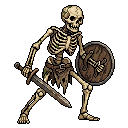 Character
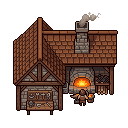 Building
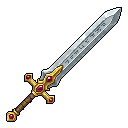 Item
What the style sets
- Sizes
- 64px and 128px
- Examples
- Character, Building, Item
How adding a style works
- Add puts the style in your project's styles and makes it the active one: the examples above steer every generation, and its look settings fill in anything you haven't set yet. Settings you already chose stay, your other styles stay, and Undo takes it back out.
- Generate. Every character, item, building or scene you prompt in the editor comes out in this style, and so do generations from Claude, ChatGPT or Cursor through the MagicPixel connector.
- A project can hold several styles, like wood, stone and metal versions of one game. Switch between them in Generate's style menu, and add or remove them here in the style library. Assets you already made stay as they are.


