
AI game asset generator for 2D pixel art games
Generate a matching kit of game assets with AI: characters, enemies, items, props, buildings and tiles in one style, edited in a full pixel art studio and synced to your game.
Real game assets from one-line prompts
Each one is a single generation, shown exactly as it was delivered and enlarged with hard pixel edges.

“red health potion in a round glass bottle with a cork”

“wooden treasure chest with gold trim”

“orange fox rogue wearing a green hood, holding a dagger”
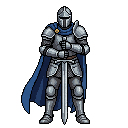
“armored knight with a blue cape and a longsword, facing the camera”
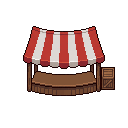
“small wooden market stall with a striped red and white awning, top-down view”
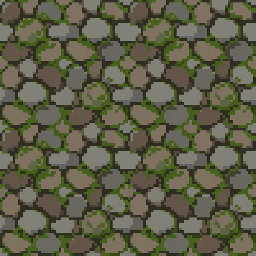
“mossy cobblestone”
What the game asset generator does
Characters and enemies
Heroes, enemies and NPCs from a prompt, with every facing and as many skins as the game needs.
Pixel art character generatorItems, props, buildings and tiles
Weapons, potions, chests, UI icons, buildings and seamless ground, wall and floor tiles, at 64 to 1024 px.
AI sprite generatorOne style for every asset
Pick a pixel art style or make one from your own art. Every asset you generate follows it, so the kit reads as one game.
Browse pixel art stylesSets from one asset
Turn one sprite into a matching set, reskins or a different object in the same spot, each at the source's size.
Ready-made assets and effects
Any paid plan, trials included, opens the asset library's sprites, packs and UI kits and the pixel art particle effects in the editor.
Pixel art particle effectsSynced with your game
The MagicPixel CLI keeps your game folder and your library in step: changed PNGs upload, and sprites you release with Sync go back to the same files.
Two-way game syncMade by your AI agent
Connect Claude, Claude Code, ChatGPT or Cursor over MCP and ask for the assets while you code.
Connect an AI assistantOne library for the whole game
Projects, folders, reusable components and Trash keep every asset of the game in one library.
From an empty folder to a game kit
- 1Pick the style your game uses, or make one from its art.
- 2Generate the main character and the first enemy, item and tile.
- 3Grow each one into sets, skins and facings at the same size.
- 4Clean up, animate and organize the assets in folders.
- 5Sync the folder with your game project, or export PNGs and sprite sheets.
Every step in detail is in the game asset workflow guide.
More pixel art tools
Game asset generator FAQ
- Is the AI game asset generator free?
- The pixel art editor is free in the browser. AI generation spends credits, which come with a Hobby, Indie or Studio plan (start with a 1-day trial) or a one-time credit pack with no subscription.
- What game assets can it make?
- 2D pixel art: characters, enemies, items, weapons, props, buildings, UI icons and seamless ground, wall and floor textures. One sprite can also become a matching set, reskins or its other facings.
- Does it make 3D models?
- No. MagicPixel makes 2D pixel art, on a real pixel grid, and exports PNGs, GIFs and sprite sheets.
- How do I keep every asset in the same style?
- Pick or make a style once. Every asset you generate after that follows its look, and reskins of your own sprites keep that sprite's palette, proportions and pixel size.
- Which game engines can use the assets?
- Any engine that reads PNGs. The MagicPixel CLI syncs sprites both ways with your Unity, Godot, GameMaker or web game folder, and writes pixel-art import settings for Unity.
- Are there ready-made assets too?
- Yes. Any paid plan, trials included, opens the asset library's sprites, packs and UI kits and the pixel art particle effects in the editor, where you make them your own.
- Do I own the assets I make?
- Yes. You own what you make in MagicPixel, including AI outputs, so you can use it in your games. See the Terms of Service for the details.