
AI sprite generator for pixel art games
Generate pixel art sprites from a short prompt, in your own style, then edit every pixel, make variants and matching sets, and send them to your game.
Real sprites from one-line prompts

“red health potion in a round glass bottle with a cork”

“wooden treasure chest with gold trim”
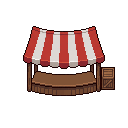
“small wooden market stall with a striped red and white awning, top-down view”
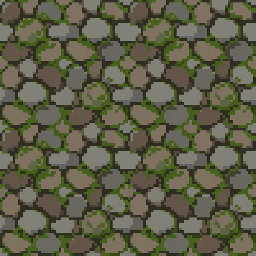
“mossy cobblestone”
What the sprite generator does
A sprite from a short prompt
Describe the subject and get a pixel art sprite at 64, 128, 256, 512 or 1024 px, on a transparent background and a real pixel grid.
Generating game spritesIn your game's style
Pick a pixel art style or make one from your own art, and every sprite you generate follows its look, in every project.
Browse pixel art stylesVariants and matching sets
Turn one sprite into named reskins, bolder variations or a matching set at the same size, so items and props belong together.
Seamless tiles
The Texture row, shown when your style has a texture image, makes ground, wall and floor tiles that fill the whole artboard.
Edit every pixel
Results land as artboards in a full pixel art editor: pencil, fill, selections, layers and palette snap on the sprite's own grid.
What's in the editorInto your game
Export PNG, GIF or a sprite sheet, or sync sprites straight into your game project with the MagicPixel CLI.
Two-way game syncMore from one sprite
- Treasure chest (source)
 Frozen ice
 Mossy and overgrown
 Cursed, glowing purple
 Health potion (source)
 Poison flask
How to generate a sprite
- 1Pick a style, or start with none.
- 2Choose the size and write a short prompt that names the subject.
- 3Keep the result you like. Every one lands as an artboard you can edit.
- 4Make variants, a matching set, or a different object in the same spot.
- 5Clean up by hand, then export it or press Sync to send it to your game.
Making heroes and enemies? The pixel art character generator covers facings and skins. Need a whole kit? See the AI game asset generator.
More pixel art tools
Sprite generator FAQ
- Is the AI sprite generator free?
- The pixel art editor is free in the browser. AI generation spends credits, which come with a Hobby, Indie or Studio plan (start with a 1-day trial) or a one-time credit pack with no subscription.
- What sizes can it generate?
- New sprites are square: 64×64, 128×128, 256×256, 512×512 or 1024×1024. Variants, edits and other facings of a sprite keep that sprite's own size.
- What should I write in the prompt?
- Name the subject and the few details that matter, like "red health potion in a round glass bottle with a cork". With a style picked, the style already sets the look, so the prompt can stay short.
- Can every sprite match my game's art style?
- Yes. Pick a pixel art style, or make your own from your game's art, and every new sprite follows it, in every project and over MCP.
- Can I edit the sprites afterwards?
- Yes. Every result lands on a real pixel grid as an artboard in the editor, where you fix pixels by hand, snap it to a palette, animate it or make variants of it.
- Can an AI agent generate the sprites for me?
- Yes. Connect Claude, Claude Code, ChatGPT or Cursor to MagicPixel over MCP and ask for sprites while you code. They land in your library, ready to edit.
- Do I own the sprites I generate?
- Yes. You own what you make in MagicPixel, including AI outputs, so you can use it in your games. See the Terms of Service for the details.