
Pixel art character generator for games
Generate heroes, enemies and NPCs from a prompt, turn each one to face every direction, give it new skins and gear, and animate it in a real sprite editor.
Real characters from one-line prompts

“orange fox rogue wearing a green hood, holding a dagger”
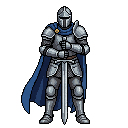
“armored knight with a blue cape and a longsword, facing the camera”
One character, every facing and skin
- Blue knight (source)
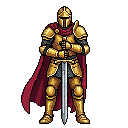 Gold
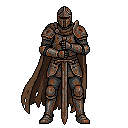 Bronze
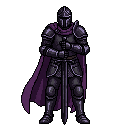 Shadow
- Fox rogue, facing south (source)
 East
 West
 North
What the character generator does
Characters in your game's style
Describe a hero, enemy or NPC and get a pixel art character at 64 to 1024 px. Your style sets the look, so the whole cast matches.
Browse pixel art stylesEvery facing
Directions draws the same character facing north, east, south and west at its own size, for top-down and RPG movement.
Skins, outfits and gear
Variants reskins a character with new colors, materials and gear at the same size and proportions. Edit changes one thing and keeps the rest.
Editing AI pixel artStart from your own character
Import a PNG, GIF, Aseprite file or sprite sheet and make facings and skins from it. Your character stays the source.
Animate it frame by frame
Frames share one layer stack, like Aseprite. Name clips for walk, attack or idle, play them back and export a sprite sheet.
Sprite sheet generatorFix any pixel by hand
Every result is an artboard in a full pixel art editor, with layers, selections and palette snap on the character's own grid.
What's in the editorHow to make a game character
- 1Pick a style, or make one from your game's art.
- 2Describe the character: who it is, what it wears and holds, and which way it faces.
- 3Make its other facings with Directions.
- 4Make skins and outfits with Variants, or change one detail with Edit.
- 5Animate the frames, clean up by hand, then export a sheet or sync it to your game.
Need the items, props and tiles around your characters too? Use the AI sprite generator, or follow the whole game asset workflow.
More pixel art tools
Character generator FAQ
- Is the pixel art character generator free?
- The pixel art editor is free in the browser. AI generation spends credits, which come with a Hobby, Indie or Studio plan (start with a 1-day trial) or a one-time credit pack with no subscription.
- Can I get the same character facing other directions?
- Yes. Directions draws your character facing north, east, south and west at its own size, so a top-down or RPG character gets its full set of facings.
- Can I make skins and outfits of one character?
- Yes. Variants makes reskins of a character with new colors, materials and gear, at the same size and proportions. Edit changes one thing, like a helmet or a weapon, and keeps the rest.
- Can I start from a character I already drew?
- Yes. Import a PNG, GIF, Aseprite file or sprite sheet, and make its other facings and skins from it. Your character stays the source, so every result keeps its look.
- Can I animate the character?
- Yes, by hand in the editor: frames share one layer stack, like Aseprite, and you name clips for walk, attack or idle and play them back. Export a sprite sheet with JSON, a GIF or PNGs.
- Can I make enemies and NPCs in the same style?
- Yes. Your active style steers every new character, and Variants can turn one character into a matching set, so heroes, enemies and NPCs read as one cast.
- Do I own the characters I make?
- Yes. You own what you make in MagicPixel, including AI outputs, so you can use it in your games. See the Terms of Service for the details.